Two-Factor vs Two-Step: Which One Actually Protects You
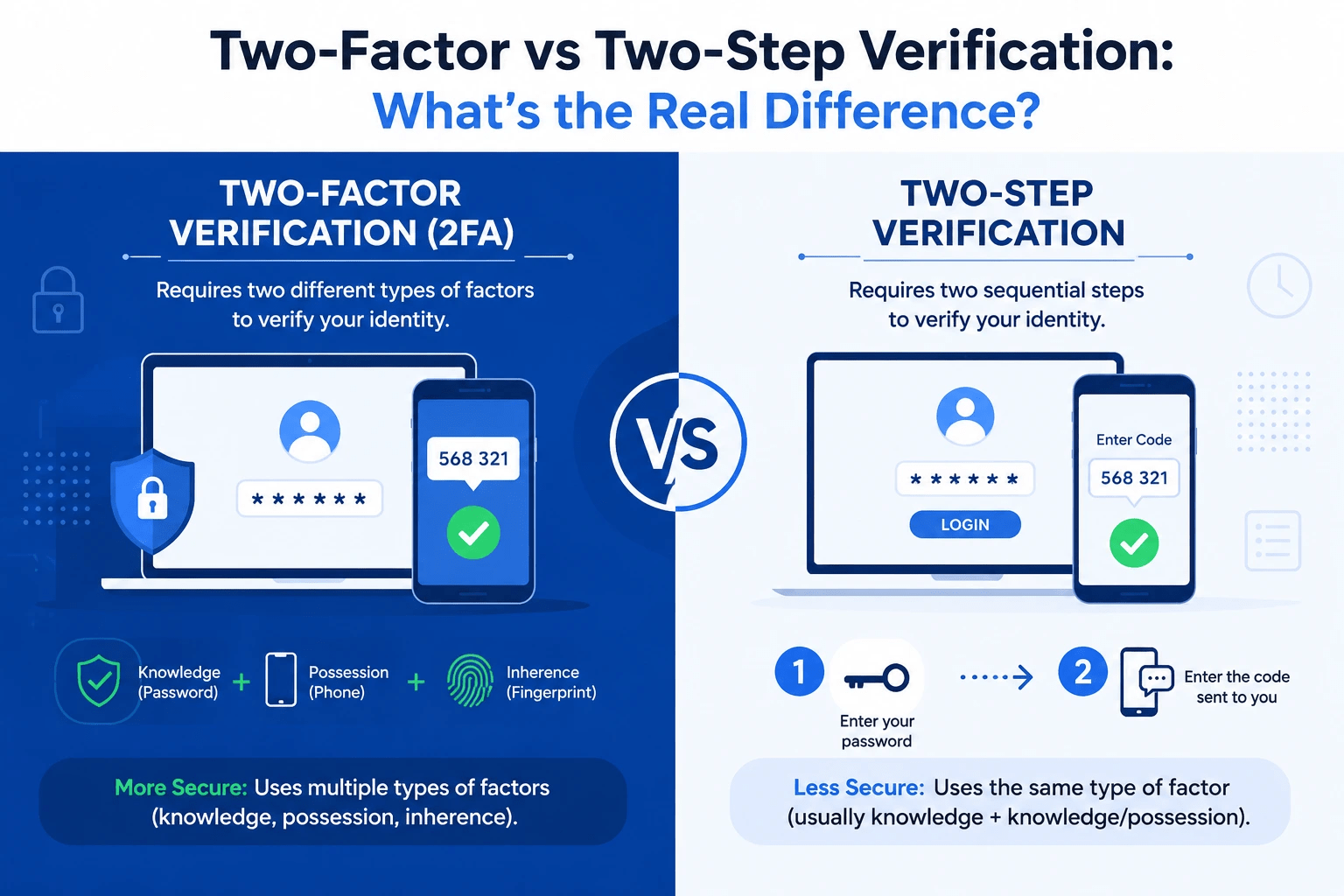
Two-Factor vs Two-Step Verification: What’s the Real Difference?
Most people use these terms like they mean the same thing. They don’t.
If you’ve ever enabled “two-step login” thinking you now have maximum security — you might be surprised to learn it’s not the same as two-factor authentication. The difference is subtle, but when it comes to protecting your bank account or email, subtle matters.
This guide breaks down exactly what separates two-factor authentication from two-step verification, which one is actually stronger, and what you should enable right now.
Why Passwords Alone Have Become a Liability
Before diving into the comparison, let’s talk about why you need either method in the first place.
A password is a single point of failure. If someone gets your password — through a phishing attack, a data breach, or even a lucky guess — they get everything. And the reality is, most people recycle the same passwords across multiple accounts. One breach cascades into five.
This is why layered authentication exists. Adding a second step means a stolen password alone can’t open your accounts. A hacker needs more than one key to get in.
The question is: how strong does that second key need to be?
What Is Two-Factor Authentication (2FA)?
Two-factor authentication requires you to verify your identity using two completely different categories of proof. These categories are:
- Something you know — a password, PIN, or security answer
- Something you have — a phone, hardware token, or smart card
- Something you are — a fingerprint, face ID, or retina scan
True 2FA pulls from two separate categories. For example:
- Password (something you know) + fingerprint scan (something you are) ✅
- Password (something you know) + authenticator app code (something you have) ✅
Because the two factors are fundamentally different in nature, a criminal would need to compromise two very different things simultaneously. Stealing your password doesn’t help them without also physically accessing your phone or body. That’s a significant barrier.
What Is Two-Step Verification (2SV)?
Two-step verification also requires two rounds of proof — but here’s the catch: both steps can come from the same category.
For example:
- Password (something you know) + emailed code (something you know) ✅ (two steps, same category)
- Password (something you know) + SMS code (this one is debatable — see below)
An emailed verification code is still knowledge-based. If someone has access to your email, they can potentially retrieve it. That makes this setup slightly weaker in theory, even though it still offers meaningful protection over a single password.
Many services label this system as “two-step login” rather than “two-factor authentication” specifically because it doesn’t always meet the stricter definition of using two distinct factor types.
Two-Factor vs Two-Step: The Core Difference
Here’s the simplest way to remember it:
2FA is about factor diversity. 2SV is about step count.
Two-step verification guarantees you go through two separate login stages. Two-factor authentication guarantees those stages draw from different types of evidence.
All 2FA is technically two-step. But not all two-step processes are true 2FA.
Side-by-Side Comparison
| Feature | Two-Factor Authentication (2FA) | Two-Step Verification (2SV) |
| Number of steps | 2 | 2 |
| Factor categories required | Must be different | Can be the same |
| Example | Password + Face ID | Password + Email code |
| Security level | Very high | High |
| Best suited for | Banking, healthcare, work systems | Social media, email, everyday accounts |
| Complexity | Moderate | Low |
Which Method Is Stronger?
Two-factor authentication wins — and here’s why.
When two factors come from genuinely different categories, an attacker faces a much harder problem. Cracking your password gets them nowhere without your physical fingerprint. Stealing your phone doesn’t help without your PIN. The attack surface across two different categories is dramatically wider than across two things in the same bucket.
Two-step verification is still far better than a single password and meaningfully reduces your exposure. It stops the vast majority of automated attacks and credential-stuffing bots cold. But if you’re protecting something sensitive, 2FA’s diversity requirement matters.
Think of it this way:
- 2SV is a deadbolt added to a door that already has a lock.
- 2FA is a deadbolt plus a fingerprint scanner.
Compared to one lock, both are more difficult to breach. One is harder to break than the other.
Common Authentication Methods Ranked by Strength
Not all second factors are equal. Here’s how popular options stack up, from weakest to strongest:
1. Email codes — Convenient but weak. Anyone with your email can intercept these.
2. SMS text codes — Common, but vulnerable to SIM-swapping attacks where criminals trick carriers into transferring your number to their device.
3. Authenticator apps (Google Authenticator, Authy, Microsoft Authenticator) — Generate time-sensitive codes offline. Much harder to intercept since no carrier or email server is involved.
4. Biometrics (fingerprint, face scan) — Highly secure and convenient. Stored locally on your device rather than transmitted over a network.
5. Hardware security keys (YubiKey, Google Titan) — The gold standard. Physical keys that must be plugged in or tapped to confirm login. Nearly impossible to phish remotely.
If you’re serious about security, an authenticator app is the minimum you should use. Hardware keys are worth considering for accounts with high value or sensitive access.
Where Each Method Makes Sense
| Account Type | Recommended Method |
| Online banking | 2FA with authenticator app or hardware key |
| Work accounts / VPNs | 2FA with hardware key |
| Email (primary inbox) | 2FA with authenticator app |
| Social media | 2SV minimum; 2FA preferred |
| Shopping accounts | 2SV is generally sufficient |
| Healthcare portals | 2FA strongly recommended |
The more valuable or sensitive an account, the more it deserves stricter factor diversity.
How to Enable 2FA on Your Accounts in 3 Steps
Setting this up takes about five minutes per platform. Here’s the general process:
- Navigate to the security or privacy settings on your account. Search for “Login Security,” “Two-Factor Authentication,” or “Sign-In Options.“
- Choose your second factor. Select an authenticator app if available — it’s more secure than SMS. Download Google Authenticator, Authy, or Microsoft Authenticator from your app store.
- Scan the QR code. A QR code will appear on the platform. Open your authenticator app, tap the “+” button, and scan it. From that point forward, you’ll be prompted for a six-digit rotating code every time you log in.
Save your backup codes somewhere secure — offline is best. If you lose your phone, those codes are your recovery lifeline.
What Happens If You Skip This Entirely?
The consequences of relying on passwords alone are well-documented and increasingly common. Credential stuffing — where hackers test stolen username/password pairs across hundreds of sites — succeeds precisely because people reuse passwords. One breach at a low-stakes site can unlock your email, and from there, virtually everything else.
Enabling even basic two-step verification dramatically reduces this exposure. Enabling proper two-factor authentication makes automated attacks nearly useless against your accounts.
The time cost is measured in seconds per login. The protection is measured in years of avoided headaches.
Where the Industry Is Heading: Passkeys
A newer approach is quietly replacing traditional passwords altogether. Passkeys, now supported by Apple, Google, and Microsoft, use cryptographic keys stored on your device to authenticate you without a password at all. You authenticate locally with biometrics (your face or fingerprint), and a secure handshake happens behind the scenes.
In effect, passkeys function like built-in 2FA — combining something you have (your device) with something you are (your biometric) — without requiring you to type anything.
As passkeys gain adoption, the conversation around two-factor versus two-step will evolve. But the underlying logic — proving identity through multiple, distinct signals — remains the foundation of secure authentication regardless of the technology.
Frequently Asked Questions
What’s the simplest way to explain two-factor vs two-step verification?
Two-step verification just means you log in through two separate stages. Two-factor authentication specifically requires those two stages to use different types of proof — one that you know, and one that you have or are. 2FA is stricter and generally more secure.
Is 2FA always safer than two-step verification?
In most practical scenarios, yes. By requiring factors from different categories, 2FA forces an attacker to compromise two fundamentally different things. Two-step verification using two knowledge-based factors (like a password and an email code) is still vulnerable if both can be accessed through the same breach vector.
Does Google actually use 2FA or 2SV?
Google’s system functions as 2FA. After entering your password, you verify via a phone prompt, authenticator code, or hardware key — each of which is a distinct factor type (something you have), not just a second piece of knowledge.
Can someone bypass 2FA?
It’s rare but not impossible. Sophisticated phishing attacks, real-time relay attacks, and SIM-swapping can undermine SMS-based 2FA. Because they are impervious to remote interception, hardware keys and authenticator apps are recommended. No security system is completely unbreakable, but 2FA raises the difficulty substantially.
Why do some sites say “two-step” instead of “two-factor”?
Mostly for marketing clarity and legal accuracy. If a system sends you a code to your email (which is still knowledge-based), calling it “two-factor” would be technically inaccurate. “Two-step” is a broader, more inclusive term that doesn’t carry the same categorical requirements.
Should I enable 2FA even on accounts I don’t care much about?
Yes, for a specific reason: less important accounts often share email addresses or passwords with more important ones. A breached throwaway account can be a stepping stone. Enabling 2SV or 2FA across the board protects your whole ecosystem, not just individual accounts.
The Bottom Line
Both two-factor authentication and two-step verification significantly increase the difficulty of account breaches. The distinction is factor diversity: 2FA demands that your two proofs come from genuinely different categories, while 2SV just requires two separate steps.
Two-step verification is a sensible and significant improvement over a single password for regular accounts. For anything sensitive — banking, primary email, healthcare, work systems — two-factor authentication is worth the marginally extra setup.
Today, start with your bank account and email.Those two alone cover the most critical attack surfaces most people face. From there, work outward.
Sources and Further Reading:
- NIST Digital Identity Guidelines (SP 800-63)
- CISA — Multi-Factor Authentication Fact Sheet
- Google Account Security Help Center
- Microsoft Identity and Access Documentation